Cloud-based (SaaS) · for series-production plants

From the ERP order to a finished production plan — on a single Gantt board.

PlanitExo's Production planning schedules orders coming from your ERP or Excel onto resources step by step, based on each article's routing — while real-time OEE measurement and a digital presence/operation log complete the picture from the shop floor, without paper or spreadsheet juggling.

The trial works best on a desktop computer.
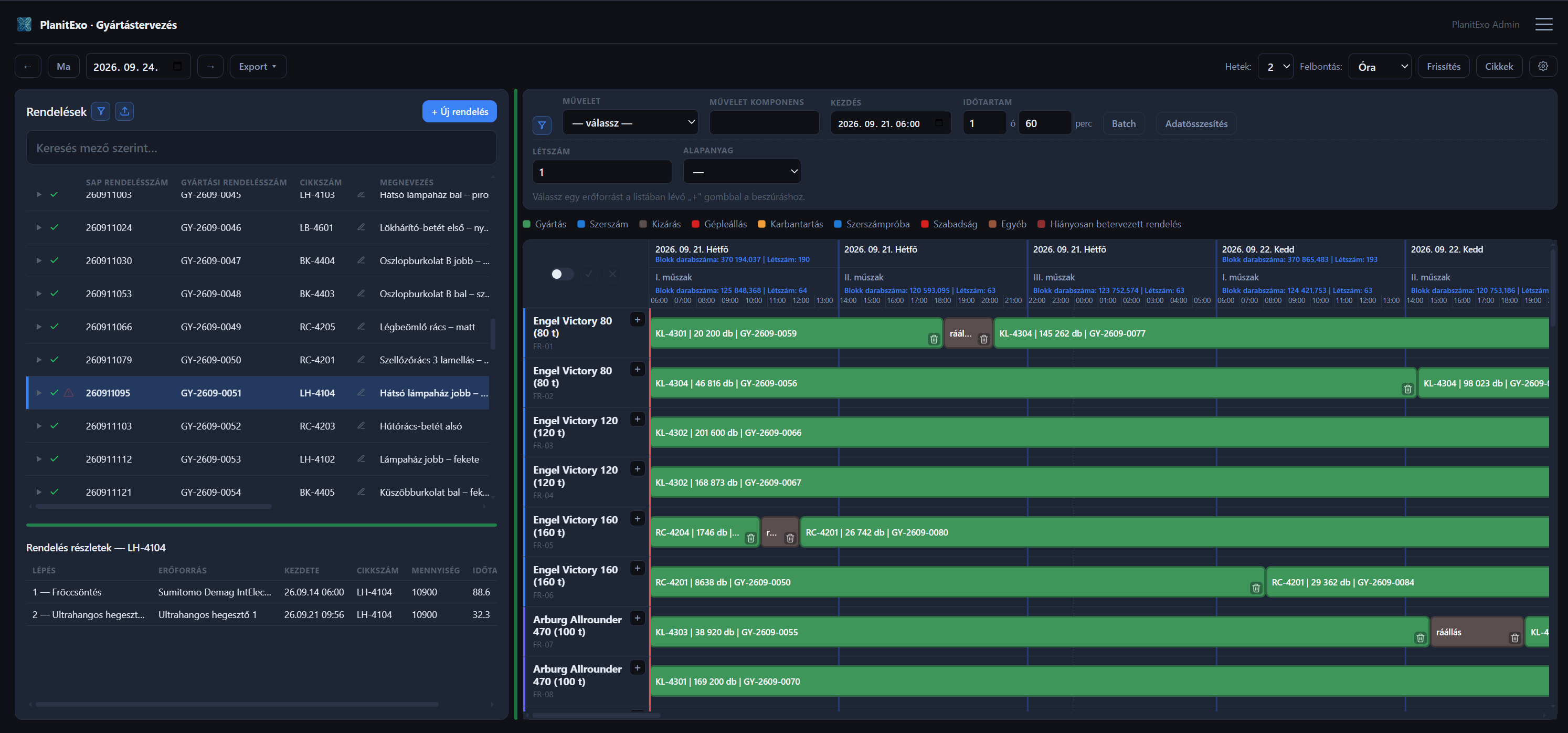
PlanitExo — Production planning: Orders panel and Gantt board

Features

Everything a manufacturing plant needs

Order-based production planning from your ERP data

Orders enter the system manually or via Excel import, each article carries a routing of production and post-processing steps, and the Gantt board shows the planned work resource by resource, with drag-and-drop rescheduling.

  • Orders and articles with routing — several resources per step, with cycle times
  • Excel import that updates existing orders by their key fields
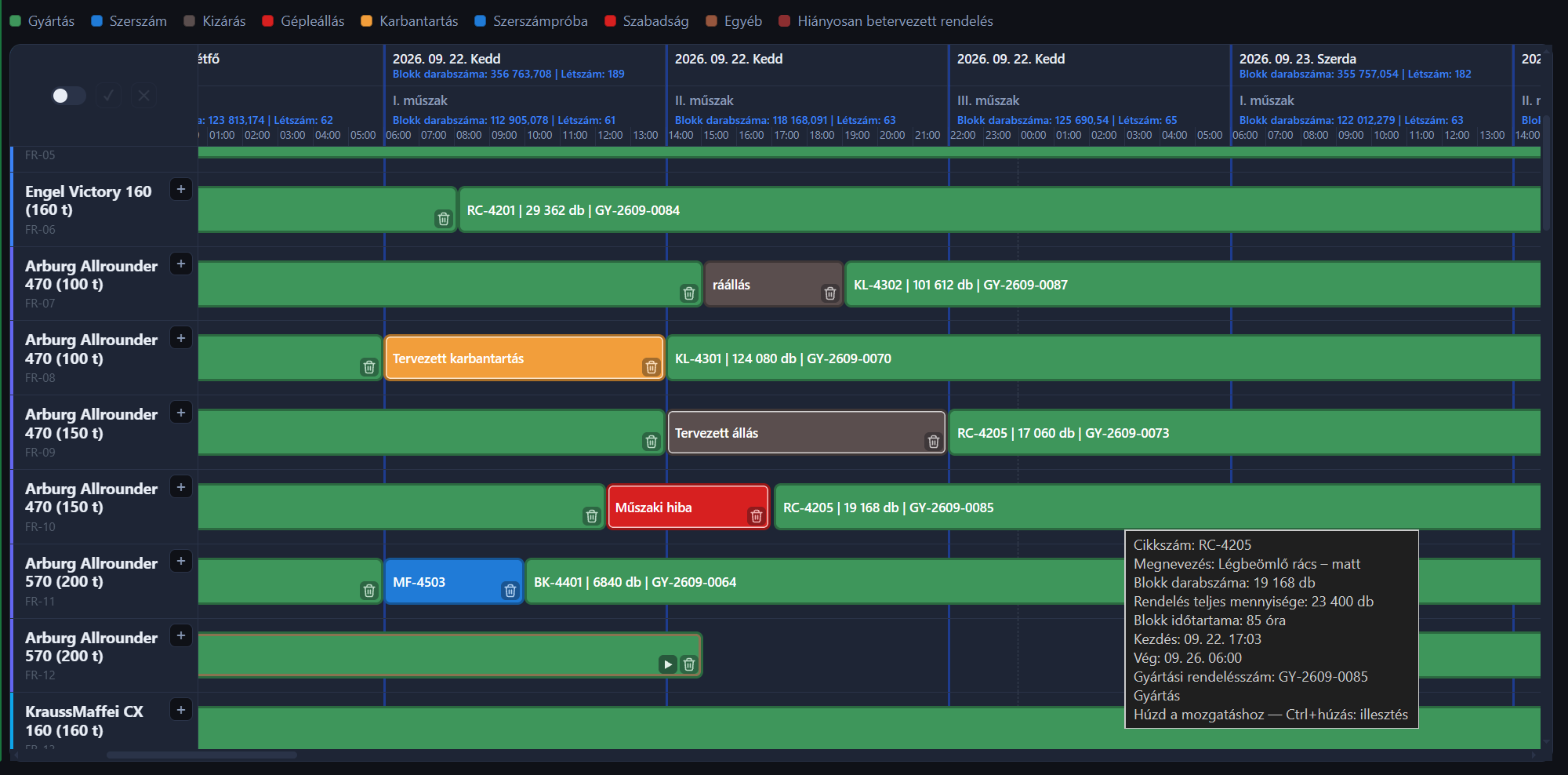
  • Colour-coded block types, exclusions and maintenance on a single board
PlanitExo Production planning — block types and legend on the Gantt board

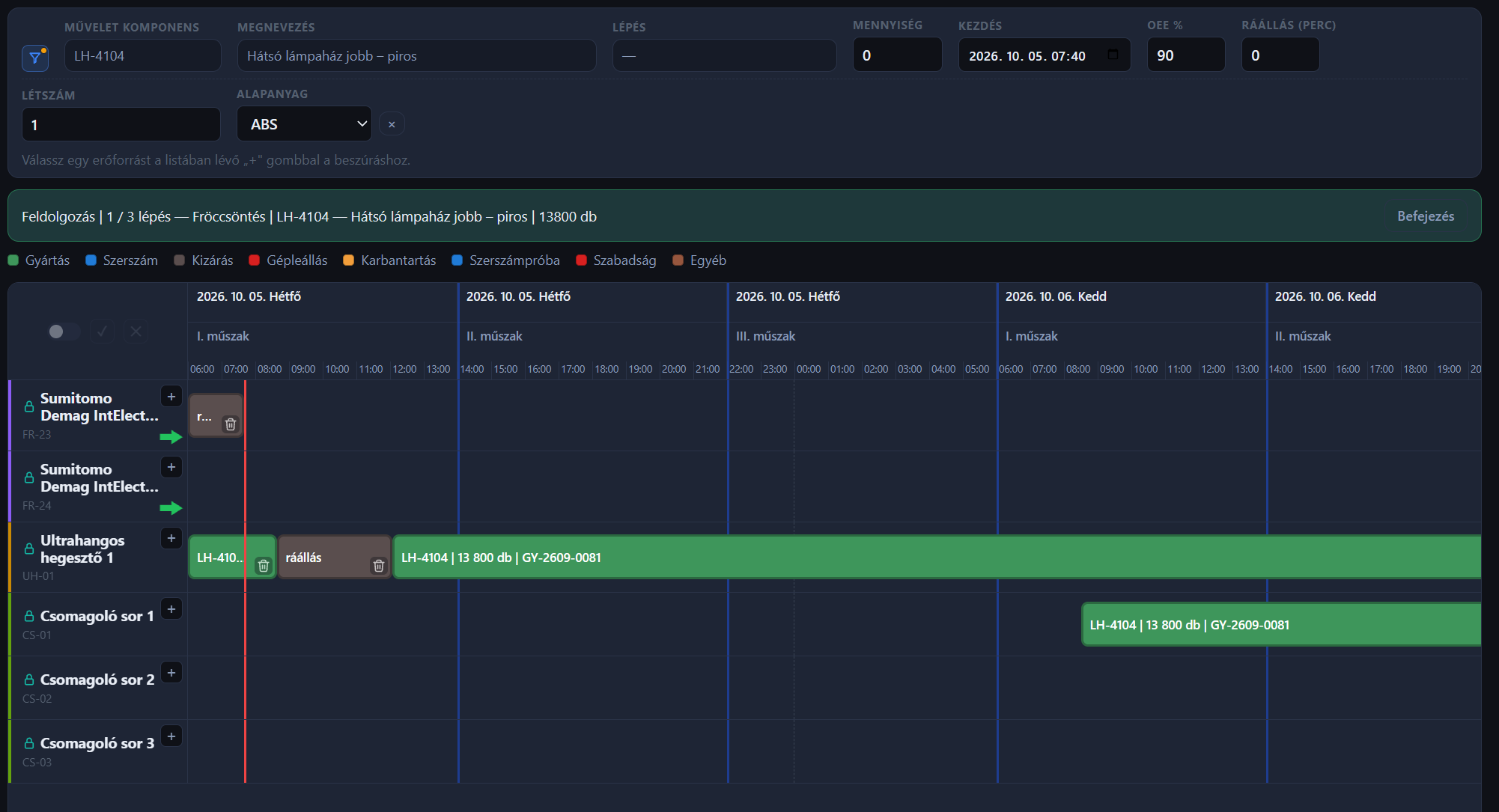
Processing: schedule an order step by step

The system highlights the resources where the next step can be scheduled, sizes each block from the quantity, the OEE % and the changeover time, and flags an order that is still incomplete in red.

  • A step can be split across several resources by the remaining quantity
  • Changeover as its own block, with the duration corrected by the OEE %
  • Return to an incompletely scheduled order with a single click
PlanitExo Production planning — Processing: the resources of the current step marked with a green arrow

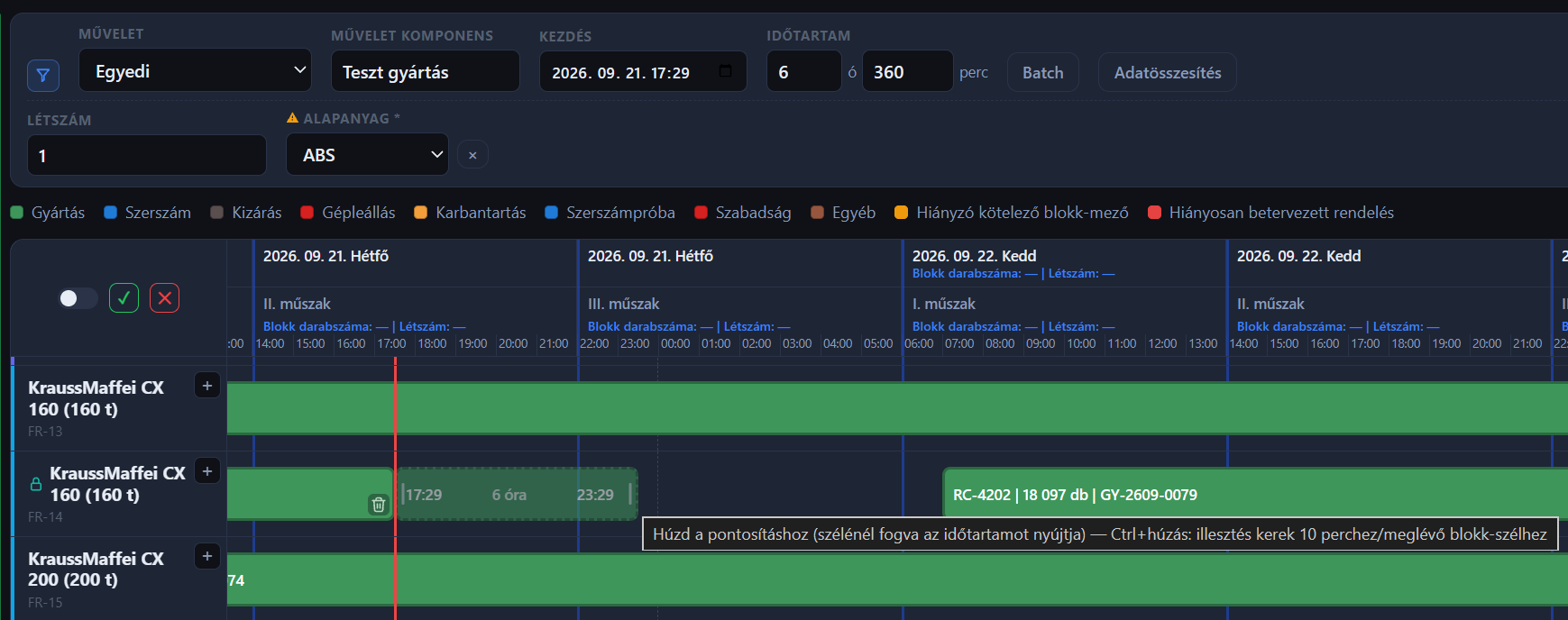
Configurable fields and per-shift data totals

Admins can define their own fields on articles, orders and blocks, and the Gantt header shows the sum or the maximum of the selected fields per shift and per day.

  • Required, sensitive and on-block fields
  • Maximum or sum, per shift and per day
  • Separate permission levels for order, article and block data
PlanitExo Production planning — custom insert bar with block fields and ghost block

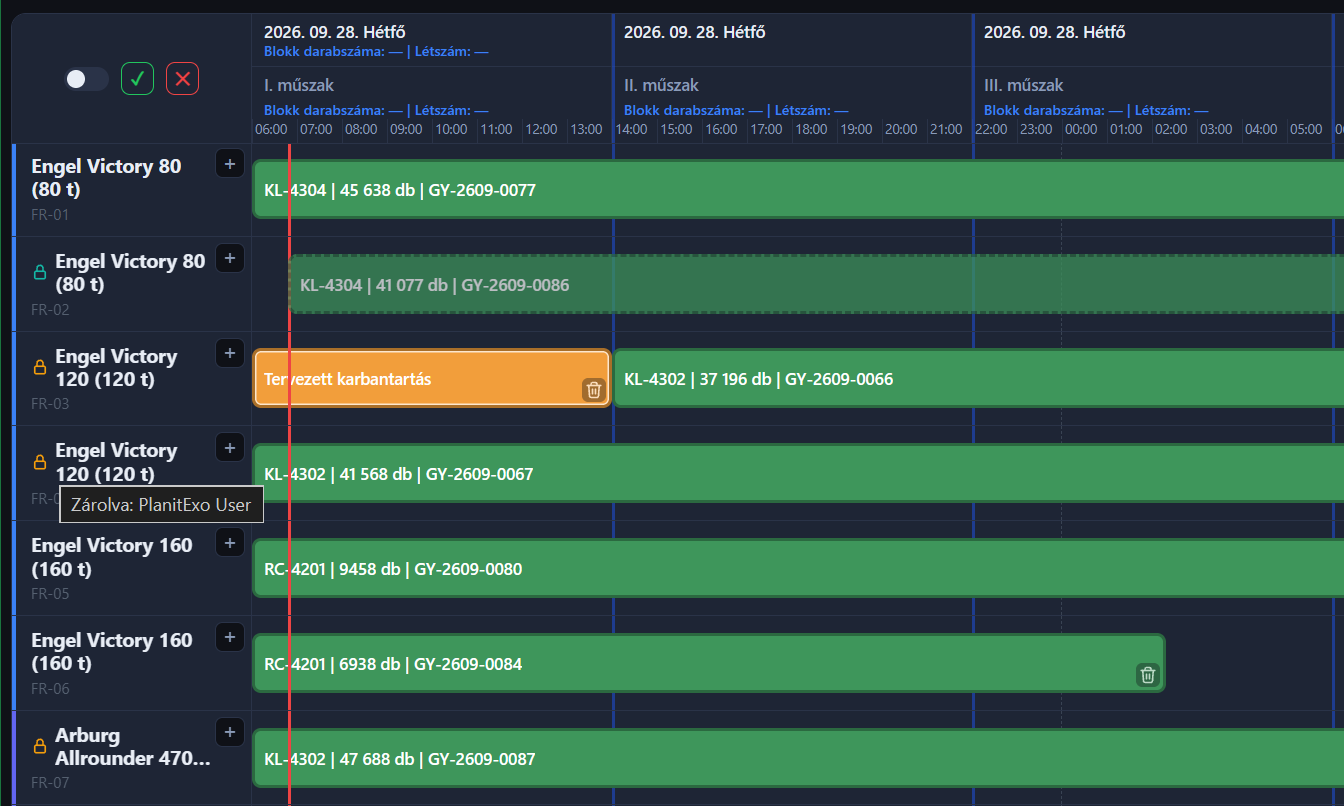
Multi-user editing and Excel exports

Resource locking prevents two people from editing the same resource, while the Weekly plan and Shift totals Excel exports fit into your existing reporting workflows.

  • Real-time locking with a padlock indicator, based on the server clock
  • Batch assignment across several resources at once
  • Weekly plan and Shift totals in Excel
PlanitExo Production planning — locked resource rows with padlock icon and tooltip

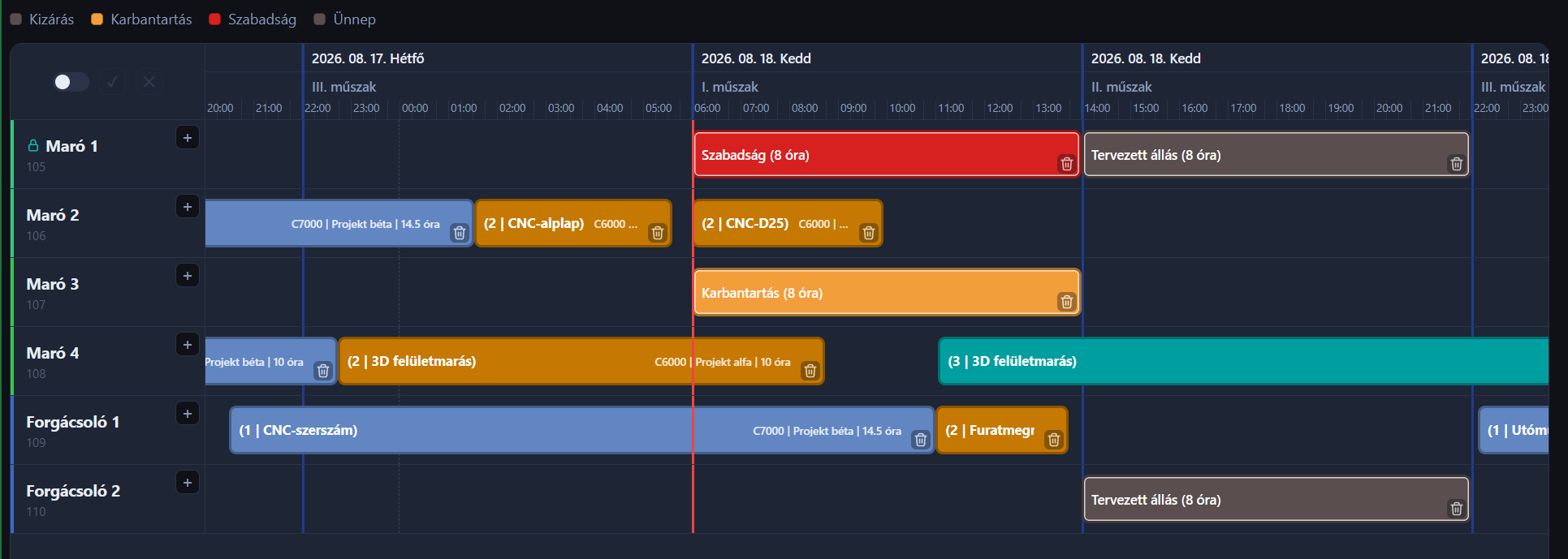
Project-based planning

Project-type work (e.g. toolmaking, development, maintenance) is scheduled by the same Gantt engine — with its own project fields, block fields and permissions independent of Production planning.

  • Project and job scheduling in one clear calendar view
  • Batch assignment across multiple resources at once
  • Excel exports for your existing reporting workflows
PlanitExo Project-based planning — projects and block types on the Gantt board

Real-time OEE measurement, per machine and shift

A four-level OEE model (Production / Changeover / Machine / Total) that shows exactly where capacity is lost — not just at month-end, but during the shift.

  • Live OEE preview right on the shop-floor tablet, while logging data
  • Machine, machine-group and plant-level rollups, with trend charts
  • Categorized downtime reasons, including micro-stops
Production OEE
91%
Changeover OEE
84%
Machine OEE
76%
Total OEE
68%

Digital presence & operation log, on a tablet

The shop-floor tablet's large, one-tap interface uses NFC card or PIN identification — no paper, no re-typing data afterwards.

  • NFC card or PIN code for worker identification
  • Start / end work with a single tap
  • Automatic presence tracking, with an admin report

Tap your card

NFC / PIN identification on the shop-floor tablet

Why PlanitExo

Simple administration, real-time visibility

Simple administration

Large buttons, one-tap logging — shop-floor staff learn it in minutes.

Built on manufacturing experience

Developed and operated on experience from multinational factories — fast turnaround, direct communication.

Tailored to your plant

Machine groups, shift patterns, downtime categories, custom fields — fitted to your structure.

Real-time data instead of paper

What happens on the floor shows up in the office instantly — no daily/weekly lag.

Secure, role-based access

Every user only sees and edits what they're authorized to.

Fits your existing workflows

Order import from your ERP via Excel, Factbird integration, Excel exports for your current reports — can be rolled out gradually, live.

About

A system born from manufacturing practice

PlanitExo is built on many years of experience in multinational factories. You plan and measure on an interface that helps the shop-floor operator, and the system connects to your ERP and to Factbird. It is made for series-production plants: plastics and chemical, food and component manufacturers.

The developer of PlanitExo worked for about 18 years as a process engineer at Henkel. Their professional experience covers production planning, production measurement and production logistics: they built and introduced such systems in series-production environments. PlanitExo grew out of this experience: a system that people on the production line actually use.

PlanitExo — LinkedIn

Pricing

Pricing guide

Prices are indicative and exclude VAT. Both the monthly and the implementation fee depend on the number of production lines, the number of modules needed, and the number of training sessions and on-site visits. The exact fee is given in an individual quote.

Monthly fee: EUR 20–60

Per resource (machine or production line) per month. For example, with 10 resources the monthly fee is EUR 200–600.

Implementation: EUR 2,600–8,000

One-time fee. It depends on the same factors as the monthly fee. Up to 20 resources it can be introduced within 5 working days.

Good to know

Frequently asked questions and details

Ready to modernize your production floor?

Get in touch, and let's see together how PlanitExo fits into your production process.

The trial works best on a desktop computer.
Blog

Latest posts

Production planning in brief →